
FREE WINDOWS DOWNLOAD · VERSION 1.2.8
Unbot
Find writing habits that sound automated. Decide what to change.
Keep your voice. Lose the stock phrases.
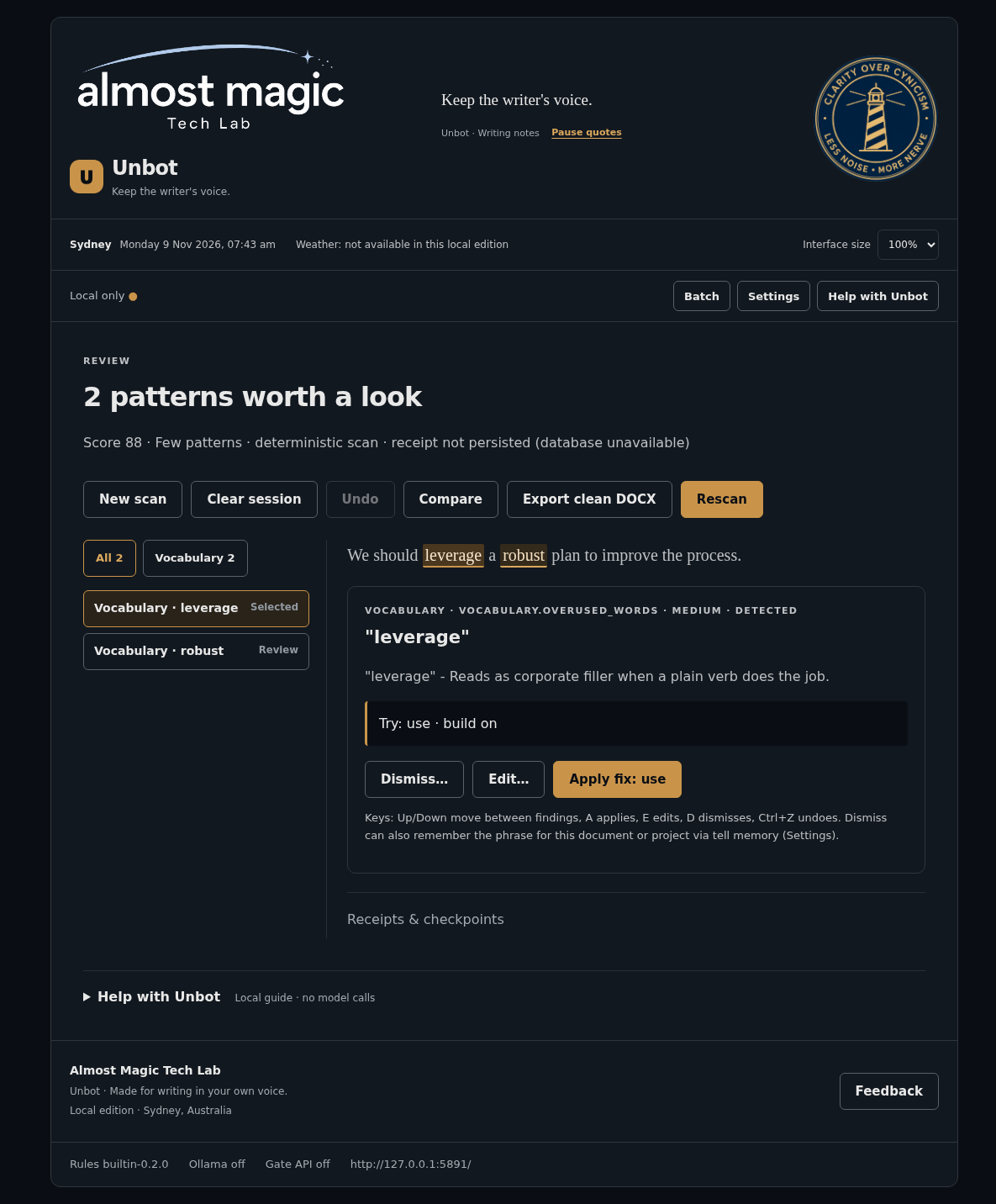
Paste text or open a DOCX, TXT, Markdown or PDF. Unbot flags repeated phrases, overused words and other patterns, explains each finding, and offers small fixes where it can. Apply a fix, write your own, dismiss it or undo. Compare your changes before exporting a clean DOCX.
These are writing suggestions, not proof that a person used AI. English rules only. Other Unicode text can be opened and exported, but Unbot makes no detection claim for it. PDF extraction is best-effort; layout and export warnings are shown before you export.
Download and run
Download Unbot 1.2.8 for Windows (ZIP, 2.07 MiB)
This is a Python source package, not a one-click installer. You need Python 3.10 or later and an internet connection to install its dependencies. Scanning runs locally after setup. The ZIP includes the launcher, README and licence.
Extract the ZIP into a new folder. In PowerShell, from that folder:
py -m venv .venv
.\.venv\Scripts\python.exe -m pip install -e .
$env:UNBOT_CONFIG = Join-Path $env:LOCALAPPDATA "Unbot\settings.json"
.\.venv\Scripts\python.exe -c "from unbot.config import load_settings; load_settings()"
powershell -NoProfile -ExecutionPolicy Bypass -File .\Start-Unbot.ps1 -Config $env:UNBOT_CONFIG
The setup creates a default settings file only if none exists; it does not overwrite your existing settings. Open http://127.0.0.1:5800/ on the same computer. To stop the server:
powershell -NoProfile -ExecutionPolicy Bypass -File .\Start-Unbot.ps1 -StopWindows tray and start-on-login are optional. From the extracted folder, start the tray with .\.venv\Scripts\python.exe -m unbot.tray. The default selection hotkey is Ctrl+Shift+U. If nothing is selected, Unbot offers a place to paste text instead. Selection capture supports plain text or an empty clipboard; it refuses rich text, images, files and custom clipboard formats without changing them. Another app locking the clipboard can prevent restoration; see the included README.
PostgreSQL 13 or later is needed for receipts, writing stats, tell memory, saved rule packs and saved checkpoints. It is not bundled. Without it, scans and edits still work, and Unbot shows which features are unavailable. Follow the README to create and connect your local database. The launcher is not a Windows service: restart it after reboot unless you have set up the optional tray start-on-login.
Check the download
2,174,619 bytes. SHA256:
5ae7b707049fa4c0f5186417beda96051cad5d8e3a3d916731458a9430c0cd3fRun Get-FileHash .\unbot-1.2.8.zip -Algorithm SHA256 and compare every character.
Your text stays local by default
No Unbot account or telemetry. The app listens only on your own computer. Deterministic scanning needs no cloud model. Optional Ollama and the token-protected Gate API are off by default. Ollama requests require your consent to the exact text and destination; private mode disables model access and the Gate API together.
Save sessions is off by default. Turning it on allows checkpoint text to be saved in your local PostgreSQL database; turning it off stops new saves but does not delete old checkpoints. Local receipts record hashes and counts, not source text. Watch-folder and batch reports are files on your computer; exports and support bundles are explicit actions. Review a support bundle before sharing it.
The download website can see page and download requests as described in its privacy notice. That is separate from local Unbot scanning.
More than a paste box
Create and test your own rule packs, review a folder or batch, and see writing stats when a database is connected. The compact email pre-send view lets you review text; it never sends mail or presses your email client's Send button. Originals are never overwritten by document export.
Free to use, not open source
Unbot is free to use under the proprietary licence included in the ZIP. Copying, redistribution, resale and derivative works require prior written permission from Almost Magic. There is no paid tier or sign-up gate.